CSV Convert
eic2ai turns ePIC podio ROOT files into flat CSV for analysis and ML training. One process reads an eicrecon file (.edm4eic.root) and, when given, its paired npsim file (.edm4hep.root) once, and hands every event to a set of writers. Each writer produces one role — one kind of dump (tracker hits, calorimeter hits, DIS kinematics, …) — streamed into <stem>.<role>.csv.zip.
eic2ai lives in its own repository and is mounted as the eic2ai/ submodule of msf-simulation-pipeline (see Full-Sim Pipeline). Its rows are identical to those of the older csv_convert/ ROOT macros, except the shared Λ decay codes; the column names follow one unified vocabulary, described in Data Format.
Roles
eic2ai --list-writers prints every role, the inputs it needs and the collections it reads.
| Role | Needs | Content |
|---|---|---|
trk_hits | reco | tracker hits (one row per hit↔MCParticle association) |
cal_hits | reco + sim | calorimeter hits |
calo_clusters | reco | calorimeter clusters (one row per cluster↔MCParticle association, with prt_origin) |
mc_dis | reco | DIS invariants (one row per event, from dis_* parameters) |
mc_particles | reco | MCParticle dump |
mcpart_lambda | reco | Λ MC truth |
reco_particles | reco | reconstructed particles |
reco_dis | reco | reconstructed DIS kinematics |
reco_ff_lambda | reco | Λ far-forward reconstruction |
lambda_acceptance | reco | per-event Λ → p π⁻ acceptance |
comb_candidates | reco | p/π⁻ combinatorics candidates (+ comb_candidates_events) |
acceptance_ppim | sim | p π⁻ acceptance (+ acceptance_ppim_prot_hits, acceptance_ppim_pimin_hits) |
acceptance_npi0 | sim | n π⁰ acceptance |
combinatorics_ppim | sim | p π⁻ combinatorics |
event_index | any | one row per event |
A role with extra outputs writes them as <stem>.<role>_<suffix>.csv.zip next to the main file. Column layouts are on Data Format; the writer sources are eic2ai/src/writer_*.hpp.
Outputs
input:   msf_9x130_0001.edm4eic.root  (+ msf_9x130_0001.edm4hep.root)
role:    trk_hits
output: msf_9x130_0001.trk_hits.csv.zip one deflate ZIP64 entry msf_9x130_0001.trk_hits.csv<stem>is the input file name without.eicrecon.edm4eic.root,.edm4eic.root,.edm4hep.rootor.root— the reco file's name, or the sim file's in sim-only runs.- The header line is always present; a role with no rows gives a header-only file.
evtis the 0-based entry counter of the run, the same in every role of one run.- Outputs are written as
.tmpand renamed when complete. A writer that fails leaves no file, and the other roles of the run are complete; a file that exists is complete.
How conversions are driven
For a campaign, simulation_pipeline/40_csv_convert.py <stage> reads the stage's dataset cards and emits one job per input ROOT file. With converter: eic2ai each job is a single eic2ai call for the roles whose zip is still missing:
converter: "eic2ai"
eic2ai_bin: "/path/to/eic2ai/build-eic_xl-26.06/eic2ai"

csv_phase10:
  input:   "${eicrecon.output}"
  pattern: "*.edm4eic.root"
  paired:  { dir: "${npsim_background.output}", suffix: ".edm4hep.root" }
  output:  "${base_dir}/csv-phase10/${energy}"
  roles:   [trk_hits, cal_hits, reco_dis, event_index]
See Running the Converter for building eic2ai, running it by hand and the full set of config keys, and Batch on SLURM for the job layout on the farm.
Legacy ROOT macros
csv_convert/ in the pipeline repository still holds one ROOT macro per role (edm4eic_<role>.cxx reads edm4eic, edm4hep_<role>.cxx reads edm4hep). They write the macro-era column names; eic2ai/column_renames.py maps those to the unified ones. A stage runs them with converter: macros (the default when no converter key is set). A macro retires once its eic2ai writer passes the parity test against it; until then both converters stay and the config selects one.
Pipeline
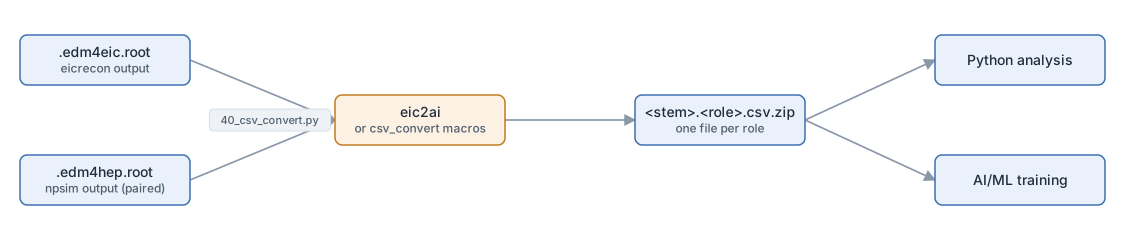
Why CSV
eic2ai reads ePIC data through the podio, EDM4HEP and EDM4EIC C++ libraries, which provide navigation between linked objects (hits → particles → vertices) through podio relations. The output is CSV because it is:
- Easy to produce in C++ — format and write lines.
- Easy to plot with Python —
pandas.read_csv()reads the zip directly. - Easy for AI / ML — CSV loads into numpy, pandas and PyTorch datasets.
- Easy for students — no special libraries needed to inspect the data.
Continue reading
- Running the Converter — build eic2ai, run it on one file, generate jobs for a campaign.
- Batch on SLURM — job layout, submission, node-local staging, farm settings.
- Data Format — column layout of every role.